Grass Go

AI & estimates

From walking the property to money in the bank in 5 minutes

14 min read

Here's a thing that should not exist anymore in 2026: a lawn care operator standing in a customer's front yard, clipboard in hand, scribbling line items so they can drive home, type those same line items into a CRM, build a PDF, email it, wait three days for a response, and then manually convert the accepted estimate into a job on next week's schedule. Then chase the check.

That used to be the job. With AI doing the transcription and formatting, and a tool that ties estimates, scheduling, and payments together, the whole loop should collapse into a single five-minute conversation. Walk the property, talk it through on your phone, send it, get paid.

Before we get to how that works, the harder thing first: how to actually price the job. Because the bottleneck on most estimates isn't the data entry. It's the operator second-guessing their own number.

How real operators actually price a job

Stop thinking in line items. When you walk a property, you're not thinking "mowing $40, trimming $15, edging $10, blowing $8." You're thinking time, equipment, and supplies. The line items are an artifact of the software, not how the work actually breaks down.

Here's how I price work, and the rates I've landed on after years of running jobs:

Standard mow, trim, blow, edge: $100/hour/man

One operator, one truck, the standard kit (mower, trimmer, blower, edger or combi-system tool). No truck hauling, no machine digging, no manual labor like pulling rock or wheelbarrowing mulch. $100 an hour is my floor for clean, repeatable yard work.

Is $100 a lot? Not really. By the time you back out fuel, equipment depreciation, insurance, self-employment tax, and windshield time between stops, $100 an hour is closer to $50-60 net. If you're charging $50 an hour, you're paying the customer for the privilege of mowing their yard.

Landscape labor (mulch, rock, manual): $125-$150/hour + supplies

The minute the job involves a wheelbarrow, a rake, manual digging, or hauling material, the rate goes up. That's $125-$150 an hour plus the cost of the supplies. Mulch, rock, plants, edging - all passed through with whatever margin you set on materials (10-20% is fair).

The reason landscape rate is higher: it's harder on your body, slower than mowing, and you're carrying inventory and material risk. You don't want to be doing back-breaking mulch jobs at the same per-hour rate as riding a mower across an HOA cul-de-sac.

Crew math: paying a guy $20-$25/hour

Once you have a second guy, the math gets uncomfortable. You need to decide: should you make money off him?

Yes. You absolutely should. You took the risk to start the business, you carry the workers' comp, you're training him, you bought the second set of equipment. ~30% margin on crew labor is the standard. If you're paying him $25/hour all-in (wage + payroll tax + comp), you should be billing his time at $35-$40/hour at minimum. Personally I run him at the same $100/hour rate I run myself when he's doing full operator-level work, and accept the margin gets fatter. That's how the business pays for itself.

Machine surcharges

Bringing the mini skid? Bringing the dump truck? That's its own line of cost on top of labor. My personal numbers:

  • $50 per yard run (one round trip to the landfill or material yard with the dump truck). Doesn't include the labor time loading; that's billed separately. The $50 is fuel, dump fees, and amortized truck wear.
  • $100/hour for the machine itself on top of the operator's hourly rate. A mini skid is not free to own - maintenance, fuel, insurance, and the day it sits in the shop instead of earning, all need to be priced in.

So a half-day mulch job with one guy and the mini skid, with two yard runs, looks like: 4 hours labor at $125 ($500) + 4 hours machine at $100 ($400) + 2 yard runs at $50 ($100) + mulch at cost + 15% ($X). That's the price. Five seconds of math, no spreadsheet.

Tree work: $100/hour/guy on the chainsaw or moving brush

Tree work is its own beast (worth a separate post), but the short version: $100/hour per guy, whether they're running the saw or moving the branches. The brush-moving guy is doing real work. He's not free. Plus haul-away on the truckloads of brush and any equipment surcharge for chippers, lifts, etc.

The honest caveat

All of these numbers assume you're a professional operator doing the work efficiently. If you're new and slower, your hour isn't worth as much because you're producing less. Don't price like a 10-year operator in year one. Price for what you can deliver and adjust as you speed up.

Why "line items" are the wrong unit of work

Notice that the framework above doesn't mention line items. Once. Because line items aren't how you think about the job. Line items are how the software thinks about the job - it needs them to build a tax-compliant invoice line. That's a software problem, not a customer problem.

When you're standing in the yard you're thinking: this is a 3-hour job, two guys, one truck, no machine, no supplies. That's 6 man-hours at $100 = $600. Done. The customer gets "weekly mowing service - $X" on their estimate, not a 14-line itemized breakdown of trimmer-line cost.

The reason traditional CRMs make you fill out line items is that they were built for shop-floor billing, where every part on the invoice maps to a SKU in inventory. Lawn care isn't parts and SKUs. It's time, equipment, and a small bag of supplies. The software should figure out how to present that on the invoice. You shouldn't.

The five-minute estimate flow

With your rates set up once, the actual estimate process collapses into a conversation. Here's what it looks like with Grass Go:

Grass Go AI assistant on iPhone, taking voice input from an operator describing a job

1. Walk the property and talk it through

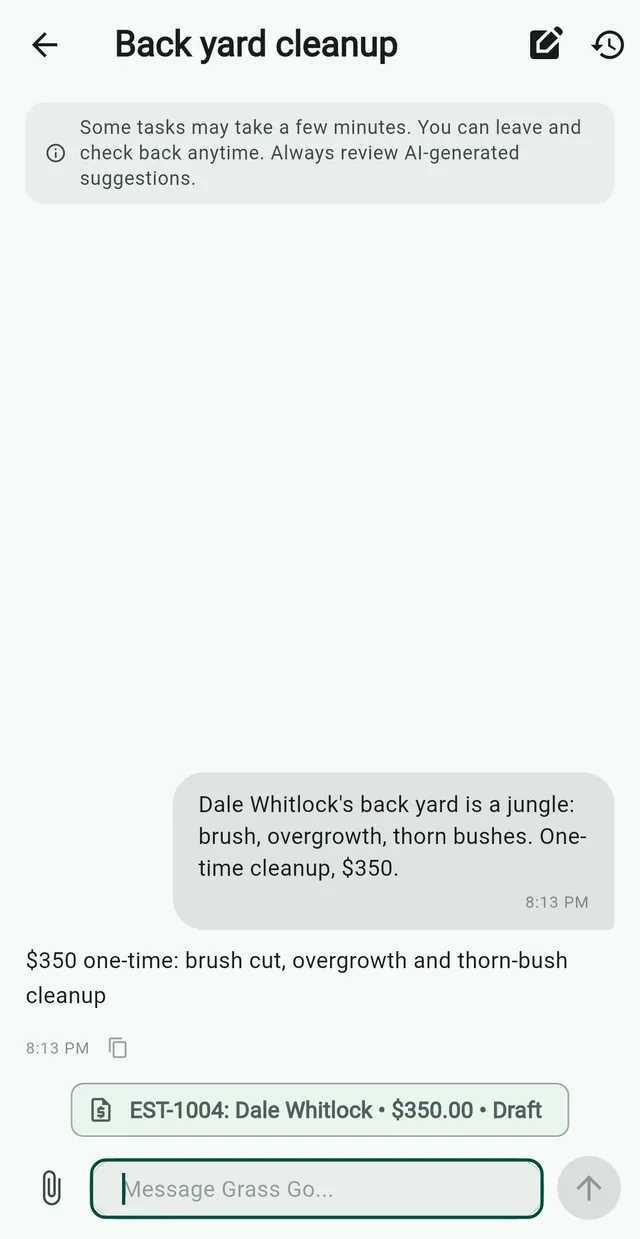
Open the assistant. Hit the mic. Talk like you'd talk to a crew member: "This is a weekly mow for the Hendersons, looks like about an hour with two guys, also they want a one-time mulch job on the front beds, probably four yards of black mulch, half day with the mini skid." Snap photos of the beds while you're talking. Done.

2. AI applies your saved rates

The AI knows your $100/hour standard rate, your $125 landscape rate, your $50/yard-run charge, and your $100/hour machine surcharge because you set them once when you onboarded. It does the math, drafts the estimate, and groups the work correctly: recurring weekly mow on one tab, one-time mulch install on the other.

Grass Go AI assistant on iPhone showing a drafted estimate ready to send

3. AI drafts the cover message

The other thing that quietly eats time: writing the email or text that goes with the estimate. The AI knows the client's history (new customer? long-time recurring? did they just refer a neighbor?) and drafts a cover message that sounds like you, not a form letter. You skim, tweak a word or two, and send.

4. One tap to send

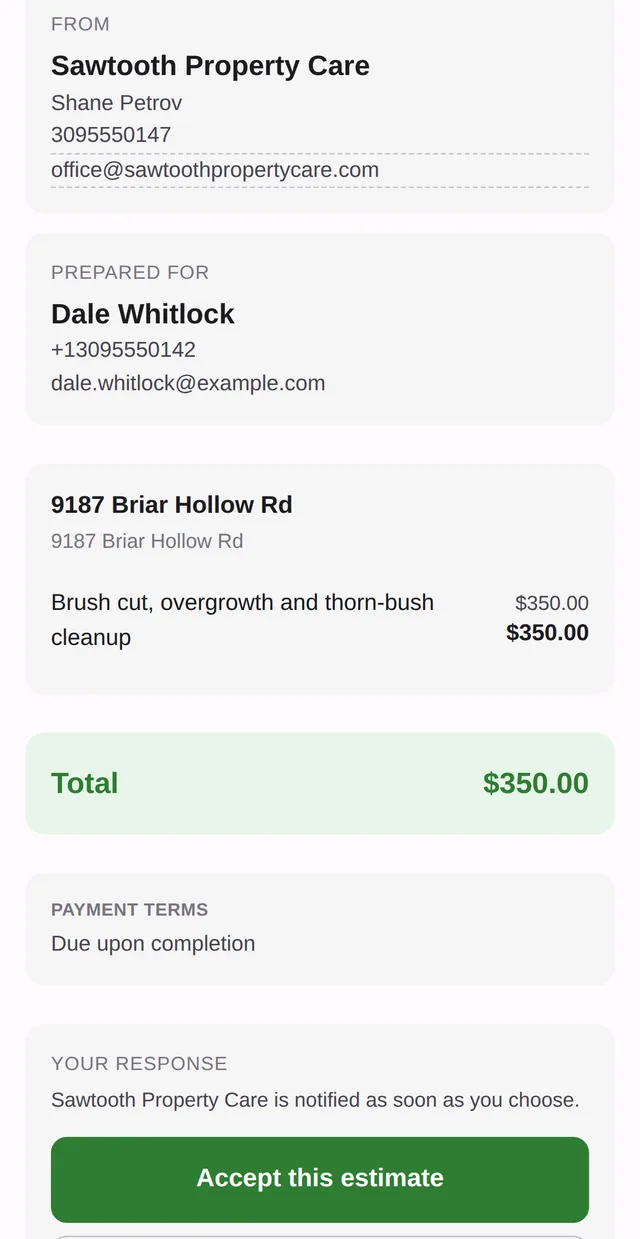
Estimate goes to the customer by email or SMS, with photos attached and a one-click accept button. No PDF, no DocuSign, no "reply to confirm." They tap accept on their phone.

Grass Go estimate proposal on iPhone, customer-facing view with accept button

5. Acceptance auto-converts to scheduled work

This is the step every other CRM gets wrong. Accepted estimate turns into actual scheduled work, automatically. The recurring mow lands on the weekly timeline at the day you specified. The one-time mulch job lands on the date you picked. No re-entering the customer name. No re-typing the address. No building a job from scratch "based on" the estimate.

6. Completed job auto-bills via Stripe

Mark the job complete on your phone. The invoice is generated from the same job (no separate invoice form to fill), and if the customer has a card on file, it's auto-charged. Money in your bank in 1-2 business days.

Why this matters: the disjointed-CRM tax

Look at how a typical job flows through the older field-service tools (Jobber, Service Autopilot, the rest):

  • Create client (form). Create property (separate form). Create estimate (line-item form). Send estimate (different screen). Wait. Customer accepts.
  • Manually open the schedule. Manually create a recurring job from the accepted estimate (different form, re-enter everything). Save.
  • Visit complete. Manually generate invoice from job (different screen, line items again). Send invoice. Wait. Email reminders. Mail paper invoice. Eventually get paid.

Each step is two or three taps and a form. None of them are hard. But you do this 10-30 times a week, every week, for the life of the business. That's the tax. It's why operators using older tools spend their evenings on the laptop instead of with their family.

The estimate-to-cash loop should be seamless. Not "integrated" (a marketing word that means "you still have to do the steps, just in one app"). Seamless, meaning the steps disappear because the system knows what comes next.

What you actually need to make this work

  1. Your hourly rates dialed in. Standard, landscape, machine, yard run, crew. Five numbers. Set once.
  2. An AI that can transcribe and format accurately. The model has to handle real vocabulary - "mini skid," "four yards of black," "weekly mow with biweekly edge" - and not turn it into nonsense.
  3. Cards on file from day one. The whole loop breaks if you finish the job and then start a 14-day collections process. See our guide to cards on file for the script that gets customers to opt in.
  4. One app from estimate to invoice. If accepting an estimate doesn't produce a scheduled job, and completing a scheduled job doesn't produce an invoice, you don't have a system. You have three apps.

Where Grass Go fits

Grass Go is built around exactly this loop. The AI assistant takes the voice or text input on the property, drafts the estimate against your saved rates, and one-tap sends to the customer. Acceptance lands on the recurring schedule without you re-keying anything. Completion fires the invoice and Stripe charge on the card you put on file when the work was approved. Five minutes of conversation, zero forms, money in the bank.

The whole app is free until you accept an online card payment. See how the pricing works.

New to running a lawn care business? Start with our full playbook for new operators and our pricing guide for a deeper breakdown of the rates above.

Ready to simplify your operations?

Start for free. No credit card required.

Get Started Free
Also available on iOSDownload on theApp Store